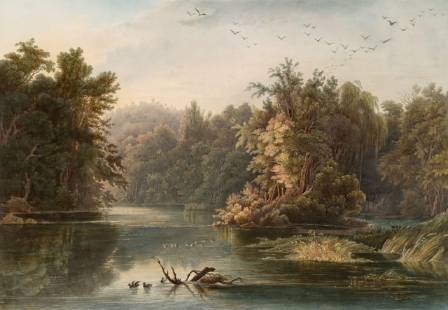
Mastering the depiction of a forest requires more than just drawing individual trees; it involves capturing an atmosphere and guiding the viewer through a dense, natural environment. By understanding how to organize complex details into a clear composition, you can transform a chaotic collection of plants into a breathtaking piece of art.
Mastering Composition in Dense Environments
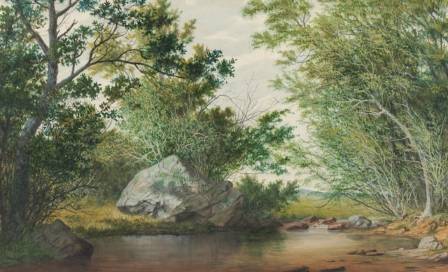
Forests are inherently "busy" because of the sheer volume of vegetation. To prevent your painting from feeling cluttered, use composition as a visual roadmap. Before committing to a final piece, create quick thumbnail sketches to test different layouts. For example, you can arrange trees and rocks to form natural lines that lead the observer's eye toward a specific focal point, such as a clearing or a hidden path.
The "Rule of Thirds" is another powerful tool for forest scenery. By placing key elements—like a unique ancient tree or a traveling character—at the intersections of a grid, you create a balanced and professional look. Setting your composition first ensures that your detailed work will have a solid foundation to rest upon.
Utilizing Values and Atmospheric Perspective
Separating your painting into values—foreground, midground, and background—is the most effective way to create depth. Generally, the foreground should contain your largest, darkest, and most detailed objects, such as a massive trunk or a character. The background often consists of the sky or distant focal points like mountains or structures.
You must also apply atmospheric perspective to make the woods feel expansive. As objects move further away from the viewer, they lose detail, contrast, and color saturation. A distant tree will appear much lighter and more desaturated than one standing right in front of you. Mastering this value shift is what gives a forest its "infinite" and mysterious quality.
Techniques for Drawing Grass and Ground Cover
A believable forest floor is rarely a flat green surface; it is a mixture of shadows, light, and various plant life. Start by filling the ground area with a base green, then block in darker patches to indicate shadows cast by the canopy above.
To create realistic grass texture, use a specialized brush to paint mid-tone blades over the edges where dark and light greens meet. This blending technique mimics the way sunlight filters through leaves. You can further enhance the ground by adding small flowers and fallen debris. For a final touch of realism, use a "glow dodge" or "add" layer to brighten the tips of the grass where direct sunlight hits the floor.
Anatomy and Texture of Realistic Trees
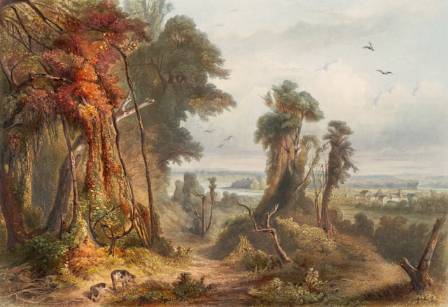
One of the most common mistakes is drawing trees as perfectly straight poles. In nature, trees are organic, curved, and irregular. To make them look lively, simplify the trunk into a basic cylinder shape first, then amplify the natural curves and burls.
Every tree species has a unique bark texture and growth pattern. Some are wide and rugged, while others are thin and smooth. It is highly recommended to use photographic references to ensure your bark textures look authentic. You don't always need to draw every single crack in the wood; sometimes using a lasso tool to create sharp, bold shapes is more effective for a stylized or concept-art look.
Adding Foliage, Bushes, and Rocks
Foliage is what makes a forest feel lush and full. To draw a bush easily, create a basic silhouette with a lasso tool and fill it with a dark base color. Layer a lighter green over it, imagining the bush as a collection of rounded volumes. Finally, use a foliage brush to add bright, yellowish-green highlights on the uppermost parts where the light is strongest.
For smaller undergrowth or saplings, start with the dark inner leaves and gradually layer lighter, more desaturated greens on top. Rocks are also essential elements; treat them as a series of flat planes. Determine where your light source is and highlight the planes facing the sun while keeping the others in deep shadow. Adding a subtle stone texture can ground these elements into the scene.
The Professional Painting Process and Final Effects
Once your basic elements are in place, you can use post-processing effects to elevate the mood. Adding fog is a classic technique for forest paintings; place it behind foreground trees to instantly separate the layers of your environment. If you find your values are lacking impact, tools like "Tone Curves" can help you fix contrast problems quickly.
Lighting effects are the "magic" of forest art. You can create sunrays (God rays) by duplicating your painting, isolating the brightest areas, and applying a gaussian blur on a "glow dodge" layer. This simulates the way light scatters through humid forest air. Finally, subtle textures like "perlin noise" or a gradient map can unify the colors and give the entire piece a cohesive, polished finish.